 |
 |
 |
|
 |
|
|
|
|
|

| WORKING HARDER TO MAKE YOUR LIFE EASIER |
| Issue 11 November 2005 | |
|
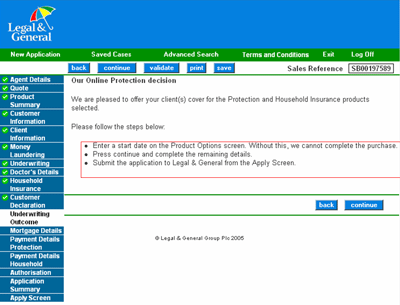
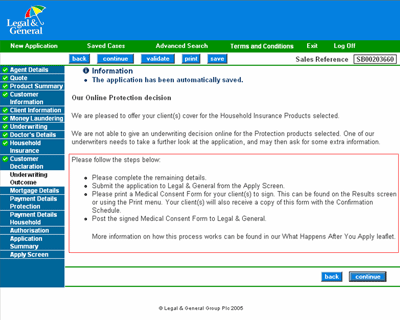
Changes to Online Protection Underwriting Outcome Screens Legal & General are continuously striving to provide you and your clients with the best possible service. In order to speed up the application process, we have amended the Underwriting Outcome screens on Online Protection, to include step-by-step instructions. The new changes should help clarify what is required following an online Underwriting decision. Below are examples of the new screens, (with changes highlighted in red) for accepted and referred decisions: Underwriting Outcome (Accepted) The first bullet will not appear if you have already entered a specific start date
Underwriting Outcome (Referred)
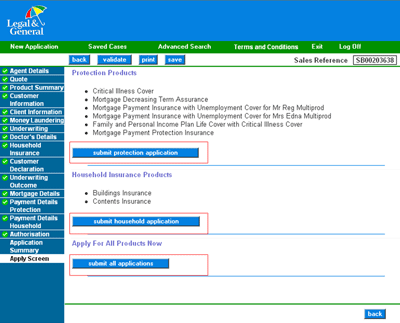
Apply Screen Based on feedback received from users, we have changed the previous wording of ‘apply’ to ‘submit’ for all products so it is clear that you are submitting the application to Legal & General. The submit buttons are now on the left under the Products.
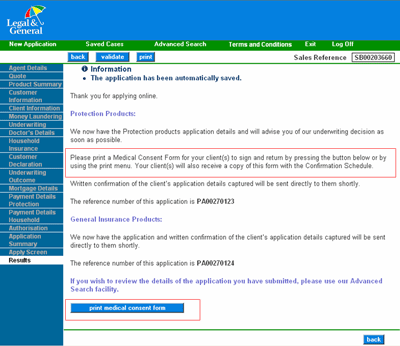
Results Screen – Referred A new ‘print medical consent form’ button has been included. If selected this will open up the print screen in the same way as the existing ‘print’ button.
We have been recently been a receiving a number of Medical Consent Forms without the application having been submitted to us, therefore we hope the above changes will assist you in knowing when to send this. Please only send in a Medical Consent Form for your clients once you have submitted the application to Legal & General. If you have any queries regarding these changes please contact us |
|||||||||
This is not a consumer advertisement. It is intended for Professional Financial Advisers and should not be relied upon by private investors or any other persons. © Legal & General Assurance Society Limited (2005) Registered in England No 166055 Registered Office: Temple Court, 11 Queen Victoria Street, London EC4N 4TP A member of the Association of British Insurers www.legalandgeneral.com/advisercentre |